The Panel
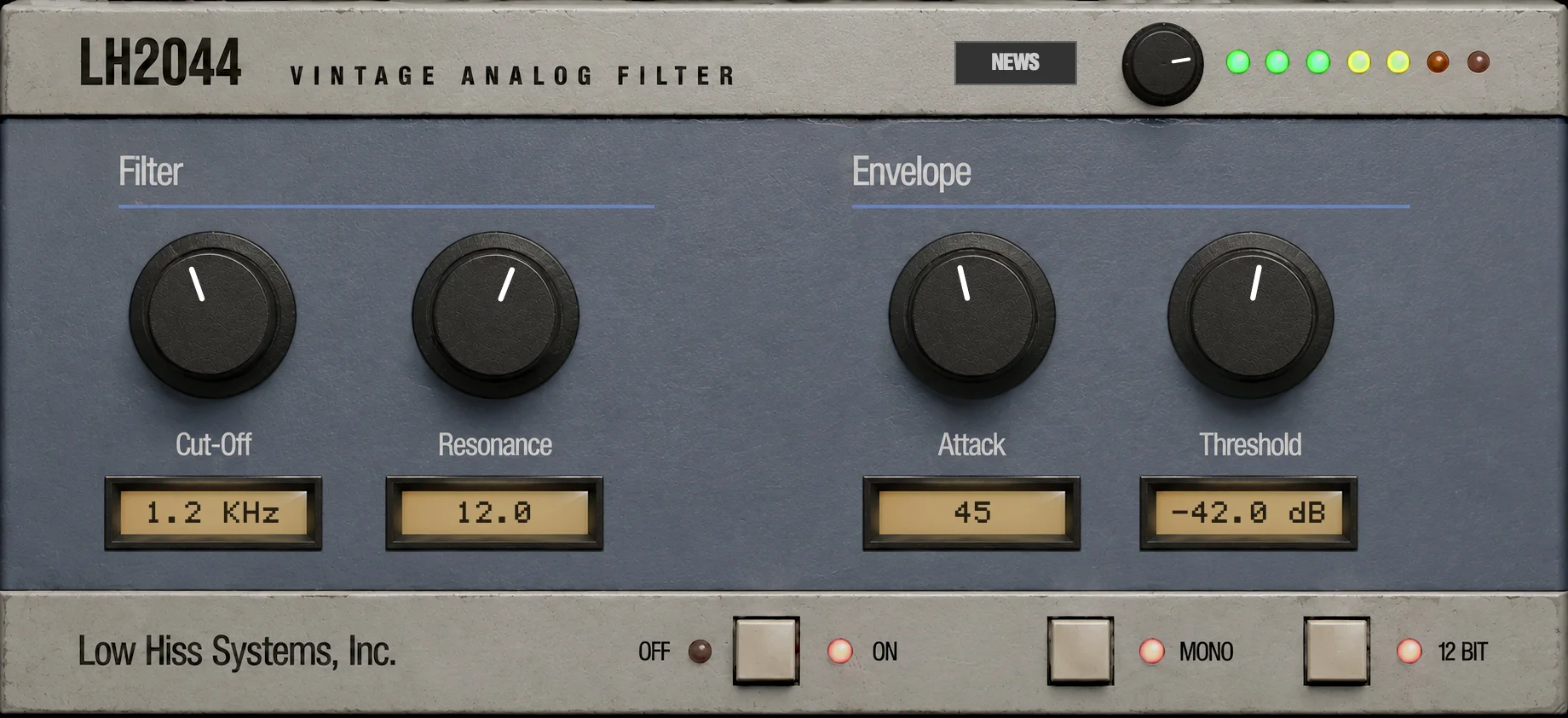
Everything LH-2044 does is on one faceplate, in three rows: the output controls at the top, the filter and its envelope in the middle, and three switches along the bottom.
At a glance
 1
2
3
4
5
6
7
8
9
10
11
- NEWS: news from Low Hiss Systems.
- Output level: the unlabelled knob beside the meter.
- The meter: seven LEDs showing how hard you are driving the output.
- Cut-Off: where the filter starts to cut.
- Resonance: the peak at the cut-off.
- Attack: how far each hit opens the filter.
- Threshold: how loud a hit must be to fire the envelope.
- Readouts: one under each knob.
- OFF / ON: bypass.
- MONO: sum stereo to mono before the filter.
- 12 BIT: 12-bit reduction at the output.
Using the controls
- Knobs
- Click a knob and drag up to turn it clockwise, down to turn it back. The mouse wheel or a two-finger scroll over a knob turns it too. On a touch screen, drag up and down on the knob.
- Switches
- Click or tap the square cream button. The LED beside it shows its state.
- Readouts
- Each knob in the middle row has a readout under it showing its exact value, in the units the parameter uses. They are display only.
Every knob and switch is also a host parameter, so it can be automated and mapped to a controller. See Automation.
The top row

Output level
The small knob to the left of the meter sets the output level, from -48 dB to +12 dB. It starts at 0 dB (unity gain), which points just short of three o'clock.
This is more than a volume knob. It sits before the output stage, so turning it up drives the filtered signal into the analog-style saturation of the SP-1200's output op-amp. Below roughly -7 dBFS the stage is clean; above it, the sound thickens and rounds off gradually instead of clipping. That is covered in The Output Stage.
The meter
The seven LEDs show the level coming out of the filter after the output knob, before the saturation stage. That is the level you are pushing into the output stage, which makes the meter a drive gauge as much as a level meter.
| LEDs lit | Colour | Level |
|---|---|---|
| 1 to 3 | Green | -48 dB to -12 dB |
| 4 and 5 | Yellow | -12 dB to -3 dB |
| 6 | Red | -3 dB to 0 dB |
| 7 | Red | 0 dB and above: you are driving the output stage hard |
The last LED lighting is not a fault. With the saturation on (the default), LH-2044 never clips digitally, so the seventh LED simply tells you the output stage is colouring the sound. The meter goes dark when the plugin is switched OFF, and while LH-2044 is not activated.
Filter
- Cut-Off
- The frequency above which the filter cuts, from 20 Hz to 20 kHz. The knob is spread so that most of its travel covers the low and middle frequencies, where small moves matter most. Default 500.0 Hz.
- Resonance
- Emphasis at the cut-off frequency, from 1 to 20. Low values give the smooth, rounded SSM2044 slope; higher values add a peak that whistles as you sweep. LH-2044 never self-oscillates, so even at 20 it stays a filter. Default 3.2.
How the filter behaves is the subject of Filter & Envelope.
Envelope
The envelope moves the cut-off for you, every time your audio hits. Your audio is the trigger: there is no MIDI and no tempo sync.
- Attack
- How far each hit pushes the filter open above the Cut-Off setting, from OFF to 100. At 100 a hit opens the filter by up to six octaves; at OFF the filter stays put. Despite its name, it sets the amount of the envelope, not its speed. Default 100.
- Threshold
- How loud the input must get to fire the envelope, from -80 dB to -10 dB. Lower values fire on quieter hits; higher values only on the loudest ones. Default -35.0 dB.
Readouts
The four readouts show each knob's value as you turn it:
| Readout | Shows | Examples |
|---|---|---|
| Cut-Off | Hz below 1 kHz, KHz above | 500.0 Hz 1.2 KHz |
| Resonance | 1.0 to 20.0 | 3.2 12.0 |
| Attack | OFF, then 1 to 100 | OFF 45 |
| Threshold | dB | -35.0 dB |
The bottom row

OFF / ON
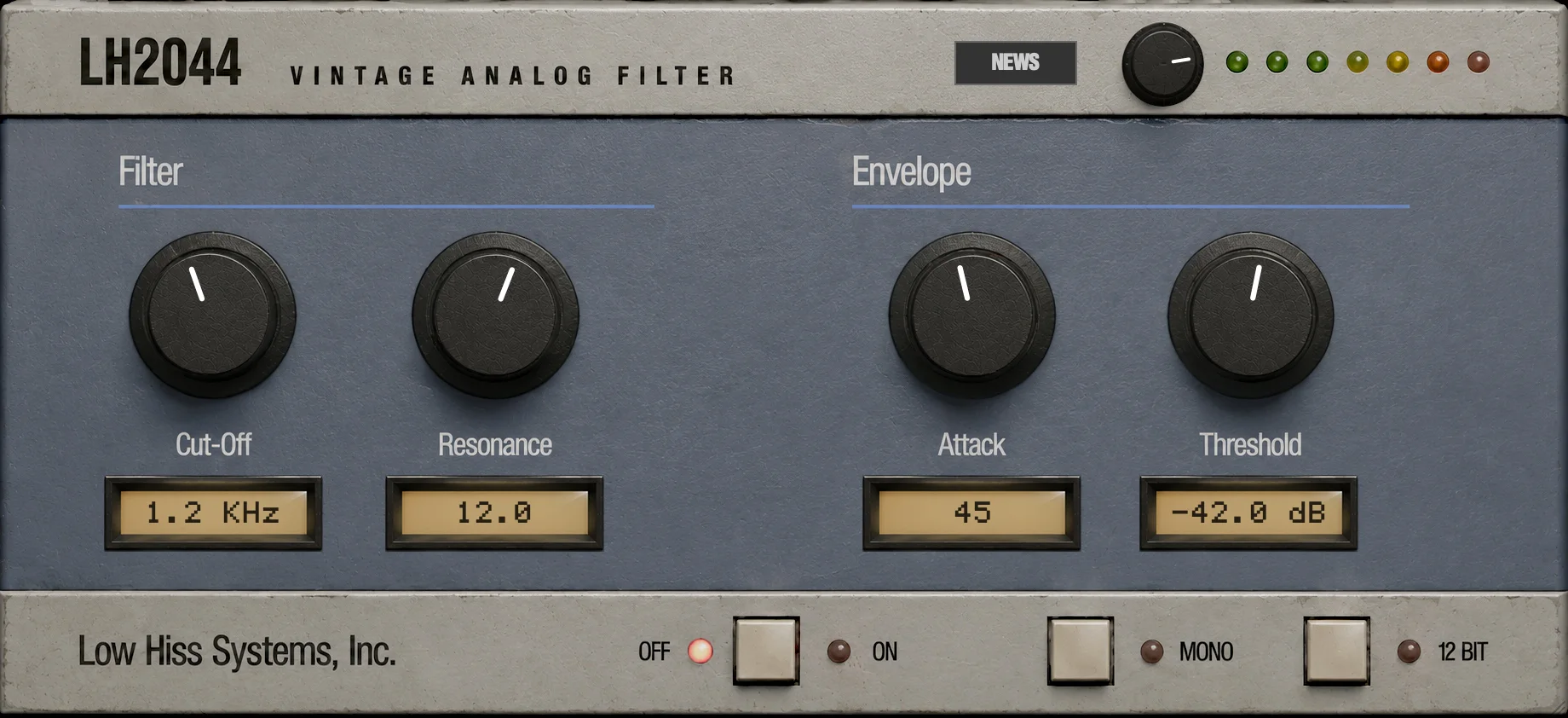
The first switch bypasses LH-2044. ON lit means the effect is working; OFF lit means your audio passes through untouched, with no filter, no envelope, no output stage and no hiss. The meter goes dark while it is off. A new instance starts ON.
MONO
When lit, LH-2044 sums the left and right channels to mono (at half level each, so the sum does not clip) before the filter, and both outputs carry the same signal. Use it for bass and kick, or to get the single-channel sound of the hardware. It does nothing on a mono track. Off by default.
12 BIT
When lit, the output is reduced to 12-bit resolution, the word length of the SP-1200's converters: 4,096 levels instead of millions. It adds a fine grain that is most audible on quiet tails and fades. On by default. See 12-bit reduction.
Window size
Desktop The plugin window opens at 736 × 337 pixels. Drag its bottom-right corner to resize it anywhere from 460 × 211 up to the faceplate's full size, 920 × 421. It always keeps its proportions. While the trial strip or an update row is showing, the window grows by their height.
iOS On iPad and iPhone the faceplate fills the space the host gives it, at the same proportions, with dark bars on the sides if the space is a different shape.