Getting Started
LH-2044 is a filter you put on a track. This chapter tells you what it is, where to find it in your host, and how to unlock it, so that your first sweep of the Cut-Off knob is five minutes away.
What is LH-2044?
LH-2044 is an emulation of the SSM2044, the four-pole analog low-pass filter chip inside the SP-1200, the SP-12, the Drumulator, the Polysix and many more legendary machines. It is the filter behind the dark, round, slightly grainy low end of decades of sampled Hip-Hop and House music.
Around the filter sits the rest of the sound of the machine it came from: an envelope that opens the filter every time your audio hits, a bass lift, an output stage you can drive into soft analog saturation, 12-bit reduction and a quiet analog hiss floor. Every one of those can be switched off, so LH-2044 works just as well as a clean, musical low-pass.
Formats and platforms
| Platform | Standalone | Plugin formats |
|---|---|---|
| MacOS | Yes | VST3, AU, AUv3 |
| Windows | Yes | VST3 |
| Linux | Yes | VST3 |
| iPad / iPhone | Yes | AUv3, for host apps such as AUM, Cubasis or GarageBand |
In a DAW, LH-2044 loads as an audio effect, so look for it in your host's effect list, on the insert slot of a track or a bus, under the manufacturer Low Hiss Systems and the name LH2044. It works on mono and stereo tracks. Using it inside a host is covered in LH-2044 in Your DAW.
Installing
Download the installer for your computer from your account on low-hiss.com and run it. It puts each plugin format in your system's standard plugin folder, so every host finds it on its next plugin scan. If LH-2044 does not show up, ask your host to rescan its plugins (see Troubleshooting).
On iPad and iPhone, install LH-2044 from the App Store. The app opens as a standalone filter, and the AUv3 appears in your host apps' effect lists as soon as it is installed.
Your licence and the free trial
The first time LH-2044 opens on a computer, the activation panel covers the faceplate. Until LH-2044 is activated or a trial is running, it outputs silence: nothing passes through it, not even with the switch set to OFF.
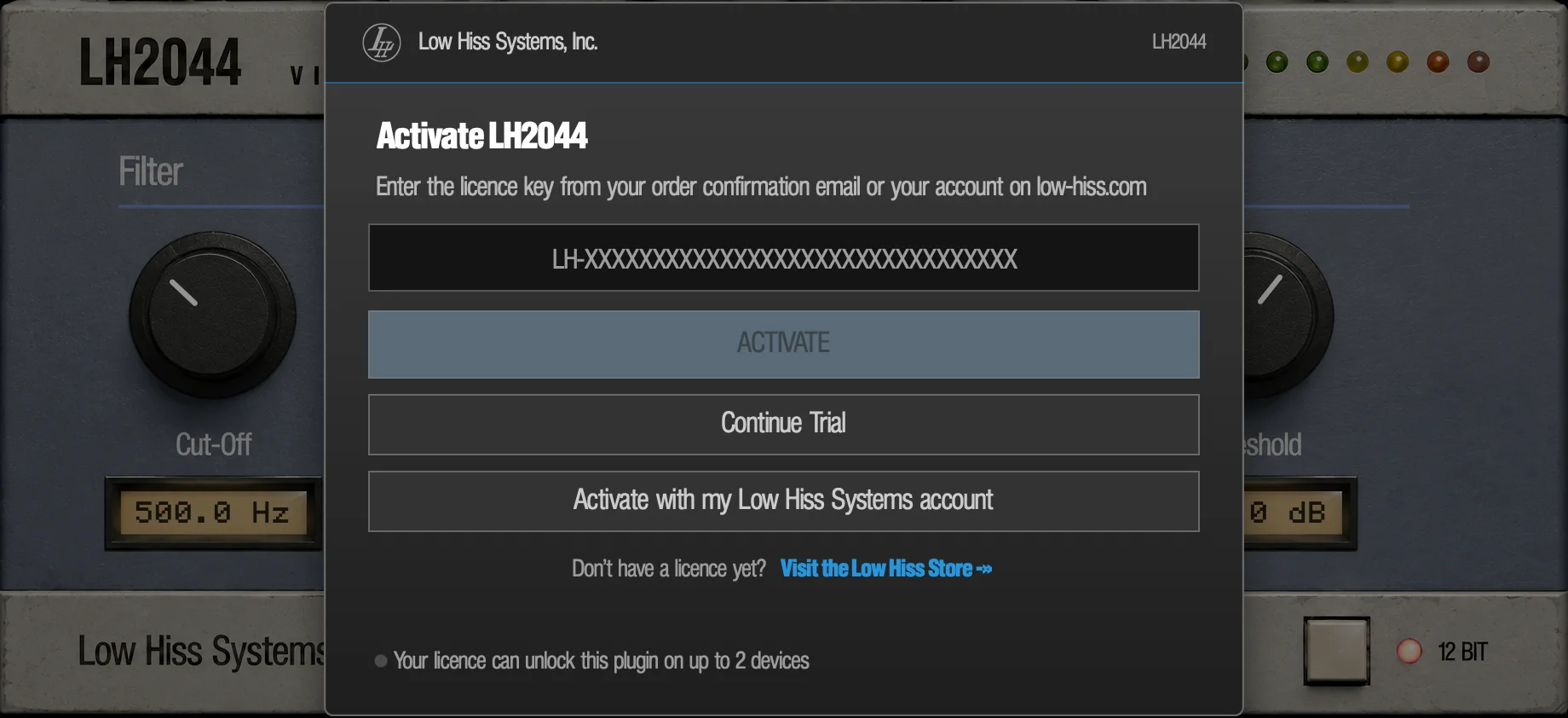
Activate with a licence key
- Find your licence key in your order confirmation email, or in your account on low-hiss.com. It starts with
LH-. - Paste it into the key field and press ACTIVATE. The panel says Contacting the activation server... while it checks.
- The panel closes and the faceplate is yours. A licence unlocks LH-2044 on up to 2 devices.
If the panel says That key wasn't recognised - check for typos and try again., copy the key again from the email, without spaces before or after it.
Activate with your account
No key to hand? Press Activate with my Low Hiss Systems account. LH-2044 asks the licence server for a short code and opens your browser. The panel changes to Confirm in your browser and shows the code in large type, the name of this computer and a countdown: Waiting for browser - code expires in 9:41.
- Sign in on the page that opened in your browser.
- Check that the code on the page matches the one on the panel, and approve.
- LH-2044 activates by itself, with no password typed into the plugin.
To use another browser, click the code on the panel to select it, copy it (Cmd+C on a Mac, Ctrl+C on Windows and Linux, or right-click › Copy) and paste it on the activation page at low-hiss.com.
The code lasts 10 minutes. Get a new code starts again, and Cancel stops waiting. If the browser denies the request or the code runs out, nothing changes and you can try again.
The free trial
Press Start 3-day free trial to use LH-2044 with nothing held back for three days. While the trial runs, a strip below the faceplate counts down, for example Free trial - 2 days left. It has three controls:
- Enter licence key
- Opens the activation panel over the trial, so a licence bought mid-trial can be activated straight away. Its Close button takes you back to the trial.
- Purchase Licence
- Opens the Low Hiss store in your browser.
- x
- Hides the reminder.
Each computer gets one trial. When it ends, the activation panel comes back with Your free trial has ended - buy a licence to keep using it., and LH-2044 is silent again until you activate. That screen also shows a Support ID: if you need help with your trial, send that ID to support.
Refresh licence
If LH-2044 ever cannot confirm its licence (for example after a long time offline), the panel returns with a Refresh licence / I just upgraded button. Press it to check with the licence server now. The status line then says Licence updated, No change or Could not reach the licence server. In the standalone app LH-2044 also checks by itself when its window comes back to the front.
On iPad and iPhone
iOS On iPad and iPhone the App Store purchase is the licence. There is no key, no trial panel and nothing to activate: LH-2044 works as soon as it is installed.
Your first sound
- Put LH-2044 on a drum loop or a drum bus and press play.
- A fresh instance starts at the settings shown below: 500.0 Hz, resonance 3.2, attack 100, threshold -35.0 dB. You should already hear the filter open on every hit and close between them.
- Turn Cut-Off up and down. Drag up to open the filter, down to close it.
- Turn Attack to zero (the readout says OFF). The filter now stays where Cut-Off puts it. Turn it back up to hear the hits push the filter open again.
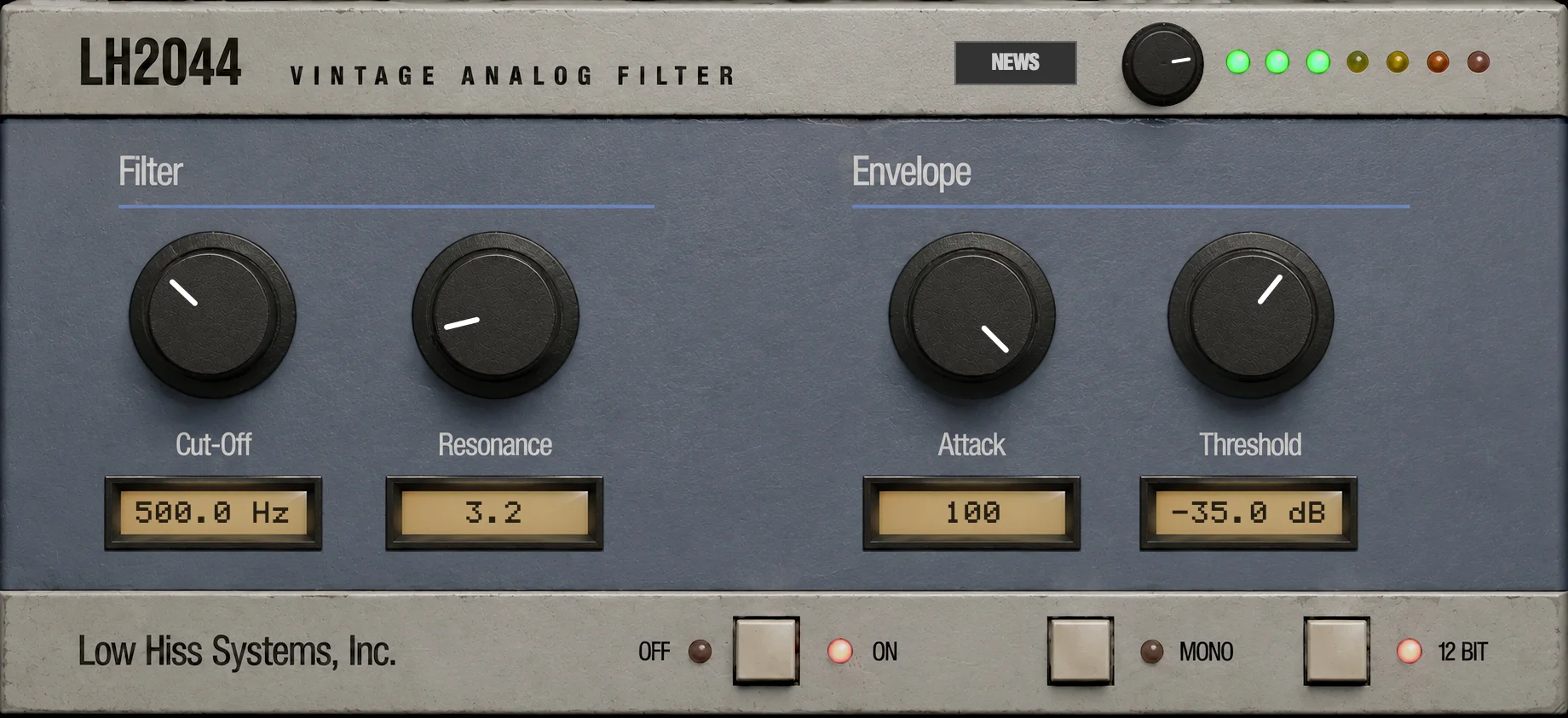
The next chapter, The Panel, goes round every control in turn.
Updates and news
Mac Windows When a new version of LH-2044 is out, a row appears below the faceplate: Update available: 1.0.3, with a Download button that opens the download in your browser. The x at the end of the row hides it for this session. LH-2044 never updates itself: you install the new version when you choose to, and your sessions keep their settings. On iPad and iPhone, updates come from the App Store.
The NEWS button in the top bar opens short news from Low Hiss Systems: new versions, new products and tips. A small dot on the button means there is something you haven't read. Press Close or Esc to go back to the faceplate. LH-2044 only fetches news after you open its window for the first time.